
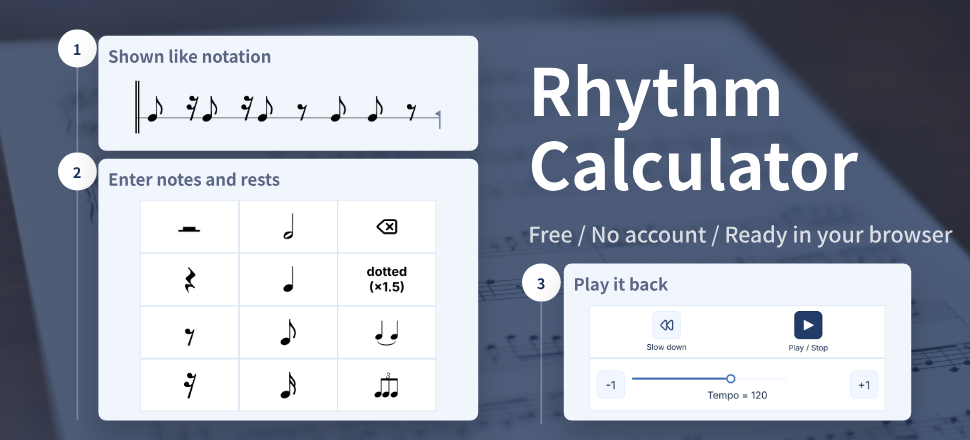
I built Rhythm Calculator around a problem I kept running into: seeing note values on a staff but not being able to hear how they fit together. The app focuses on written rhythm, immediate playback, and short practice loops because that is what I needed in the practice room.
The app was originally released as Rhythm Reader. You tap in the notes and hear the rhythm immediately, so you can connect what is on the page with what your ears and hands need to do.
There is nothing to install. Open it in your phone or desktop browser at https://rhythm-calculator.colour-field.jp and start practicing.
The story starts with a bass part, a short deadline, and a rhythm I could see but could not yet feel. If a similar passage is holding you up, you can use the same small, listen-first workflow.
For the practical workflow and feature details, read what a rhythm calculator does.
For the shorter, more personal version of this origin story, read Why I Built Rhythm Calculator.
How Rhythm Calculator Started at Band Camp
I was playing electric bass at a three-night, four-day band camp when a difficult B-section rhythm became the problem. We had to learn the song quickly, but the rehearsal space had no desk for a computer and no time for a complicated setup.
Before building the app, I used MIDI software with every pitch set to C so only the rhythm mattered. A roughly 30-second phrase could still take 10 to 20 minutes to enter: start the computer, choose the note lengths, add placeholder pitches, and repeat the process. The app removes that pitch-entry step and makes the same check possible from a phone or tablet on a music stand.
"At my university light-music club, we had a three-night, four-day summer camp where we'd have to nail a song in that time. We weren't in a studio, and there was no chance to plug rhythms into a PC. I thought — wouldn't it be great if you could just tap out a rhythm on your phone?"
— Suzukake, developer of Rhythm Calculator
That is why the interface feels like a calculator. Tap the note buttons on screen and the staff updates. Press Play and a synthesized click tracks the rhythm. There is no sound library to download, which keeps the tool light enough to use in the middle of practice.
Why Notation Display and Click Sound Matter
The unexpectedly tricky part was getting the notation display right. Even when two rhythms have the same length, dotted notes and tied notes can look very different on the page. I adjusted the display carefully so the rhythm still looks familiar to someone reading a real score.
I also added a fade-out to reduce the little pop you hear when a sound stops abruptly. The click should be clear enough to follow without becoming tiring during a longer practice session.
"Real-time synthesis keeps the latency low, but it's hard to push the attack of the sound, so the tone ends up a bit cutesy — 'pip-pa.' I paid close attention to noise handling so it stays comfortable over long sessions."
— Suzukake, developer of Rhythm Calculator
Who Can Use Rhythm Calculator?
The main user is a musician practicing a real song: a difficult measure in a bass line, guitar part, piano score, drum pattern, or vocal phrase.
It can also be useful when a teacher or bandmate wants to share one rhythm as a link. That is a possible extension of the same individual practice workflow, not a claim about classroom results.
How the App Evolved: Time Signatures and Swing
When I first talked about the app, time signatures and swing were still ideas for the future. Today, Rhythm Calculator supports 2/4, 3/4, 4/4, and 6/8, and it can also play rhythms with different swing feels.
The important choice was to keep the notation easy to read. The score stays as written while the playback timing changes, so you can hear straight rhythms, shuffle, and swing without making the screen harder to understand.
"I wanted swing to be something you could feel right away, without needing to understand a lot of theory first. The challenge was keeping the control simple while still making the playback feel musical."
— Suzukake, developer of Rhythm Calculator
A Message from the Developer — "I Made This App to Save My Past Self"
Here is the short version of why I keep working on it.
"In a word, it's an app I made to save my past self. I struggled when I couldn't picture a rhythm just by looking at a note — and I made this hoping it would help anyone who went through the same thing. You don't need the app store; just open https://rhythm-calculator.colour-field.jp in Chrome or Safari and you can use it right away. If reading sheet music has always been hard for you, please give it a try!"
— Suzukake, developer of Rhythm Calculator
The first step can be simple: enter the rhythm, listen to it, and let it become something your body can copy. The app is for performers who already have a passage to practice, whether they are students, hobbyists, or experienced players working against a deadline.
Current Rhythm Calculator Features
- Browser-based app: https://rhythm-calculator.colour-field.jp
- Notation display: see the rhythm you entered as score-style notation.
- Instant playback: listen right away, with click-noise control for comfortable practice.
- Readable rhythm details: support for ties, dotted notes, and triplets.
- Time signatures: 2/4, 3/4, 4/4, and 6/8 are supported.
- Swing playback: hear straight, shuffle, and swing-style rhythms without changing the notation.
If one passage keeps making you stop, open the app on your phone or PC, enter that passage, and see whether hearing it changes the way you play.